Hindi Speech To Text1.34
Publisher Description


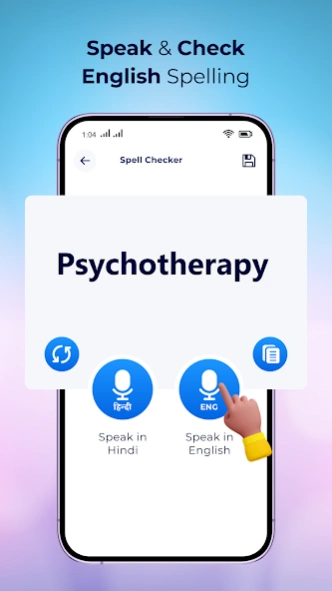

Speak in Hindi and get automatic text typed in Hindi.
You now don't need Hindi keyboards to type in Hindi. Just use this application, speak in Hindi and get your Hindi text automatically typed. A very easy and simple application but very useful. The app will capture your voice and convert it to Hindi Text.
App features :
- Speech to text service used to get Hindi typed automatically on speaking Hindi sentences.
- Press mic button and speak in Hindi to get Hindi text typed automatically.
- You can use these Hindi text to share using different application as text message, use it to chat on chatting application.
- You can copy the text and use it anywhere you like.
- You can use it in many ways like you can tweet in Hindi, draft a text message in Hindi, send message on social websites in Hindi, learn how to write Hindi and many more ways.
- Learning Module:
-> Easy to learn alphabets, vowels, words and sentences.
-> Get correct pronunciation of word using speak function.
- All Language Translator:
-> Speak to input text in multiple languages.
-> Easily copy, share, delete sentences and words.
-> Save data manually.
About Hindi Speech To Text
The company that develops Hindi Speech To Text is JVR Developers. The latest version released by its developer is 1.34.
To install Hindi Speech To Text on your Android device, just click the green Continue To App button above to start the installation process. The app is listed on our website since 2026-03-10 and was downloaded 12 times. We have already checked if the download link is safe, however for your own protection we recommend that you scan the downloaded app with your antivirus. Your antivirus may detect the Hindi Speech To Text as malware as malware if the download link to com.jvr.dev.hindispeech is broken.
How to install Hindi Speech To Text on your Android device:
- Click on the Continue To App button on our website. This will redirect you to Google Play.
- Once the Hindi Speech To Text is shown in the Google Play listing of your Android device, you can start its download and installation. Tap on the Install button located below the search bar and to the right of the app icon.
- A pop-up window with the permissions required by Hindi Speech To Text will be shown. Click on Accept to continue the process.
- Hindi Speech To Text will be downloaded onto your device, displaying a progress. Once the download completes, the installation will start and you'll get a notification after the installation is finished.
Program Details
System requirements
Download information
Pricing
Version History
version 1.34
posted on 2026-03-10
- Improved Performance.
- Solved errors and bugs.
version 1.32
posted on 2024-09-19
- Improved Performance.
- Solved errors and bugs.
- Better UI.
